How to find an actor from a TV show or movie screenshot
You’re watching a show or film, someone walks into frame, and the face is instantly familiar — but the name sits on the tip of your tongue. Credits are twenty minutes away. Typing “actor brown hair heist show” into Google rarely helps when all you have is the paused image.
This guide walks through a practical way to identify an actor from a screenshot or a phone photo of the TV: when a still is good enough, how to capture it, which tools fit tip-of-the-tongue face ID, and how CelebSpotter fits that job without pretending to be a selfie lookalike app.
What you’re actually trying to solve
There are two different problems people mix up. One is “who plays this character?” — you know the title and role, so IMDb or a normal web search wins. The other is “I only have the face.” That second problem needs a visual cue: a screenshot, a still, or a photo of the screen. CelebSpotter is built for that second case on iPhone and in the browser.
If you already know the show and character name, skip the photo tools and search “who plays …” first. Come back here when keywords fail and the face is your only lead. When you have no title at all — only the tip-of-the-tongue itch — start with can’t remember an actor’s name.
Step-by-step: from pause to a name
- Pause on a clear view of the face — front-ish when you can, large in the frame, not a tiny figure in a group shot.
- Capture the still: photograph the TV with your phone, or save a streaming screenshot if the player allows it.
- Crop attention to the face in your mind — tools work better when the face dominates the image and glare is low.
- Run a face identification pass with CelebSpotter (browser or iPhone) and read Solid vs Possible.
- Confirm with Wikipedia or IMDb when the match feels right — especially before you tell someone else.
Worked example: input still → Solid result
Here is one authorized, recorded product example — not a staged concept render and not a promise that every scan will look like this. The input is a clear paused still with faces large enough to box; the output lists suggested names with Solid confidence when the match is strong.
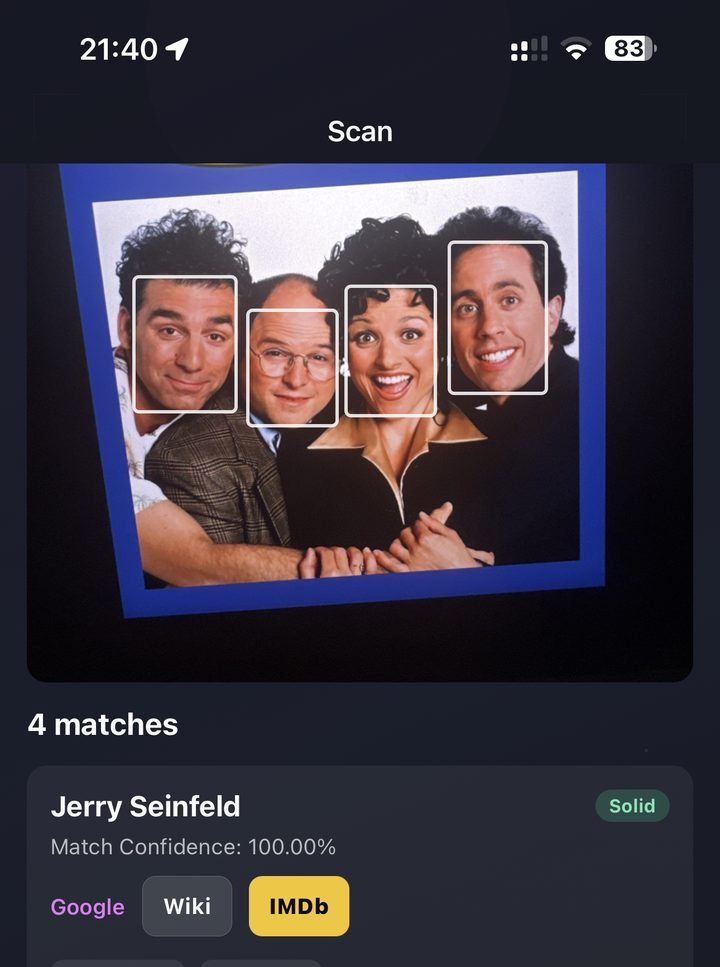
- Input quality: faces fill the frame, front-ish angles, low glare — the same habits listed above.
- Output reading: Solid means we’re pretty sure; use Google / Wiki / IMDb links on the result to confirm before you share.
- Expectation setting: CelebSpotter is in beta. A clean still can still miss someone, and a Soft or awkward pause can return nothing useful.
When the match is uncertain (Possible)
Possible means it might be them — useful as a hint when the shot is awkward, partial, or the person is less famous. It is not proof. If Possible feels wrong, rewind for a clearer beat and try again rather than forcing the first guess. Confirm on IMDb or Wikipedia before you treat any beta label as settled.
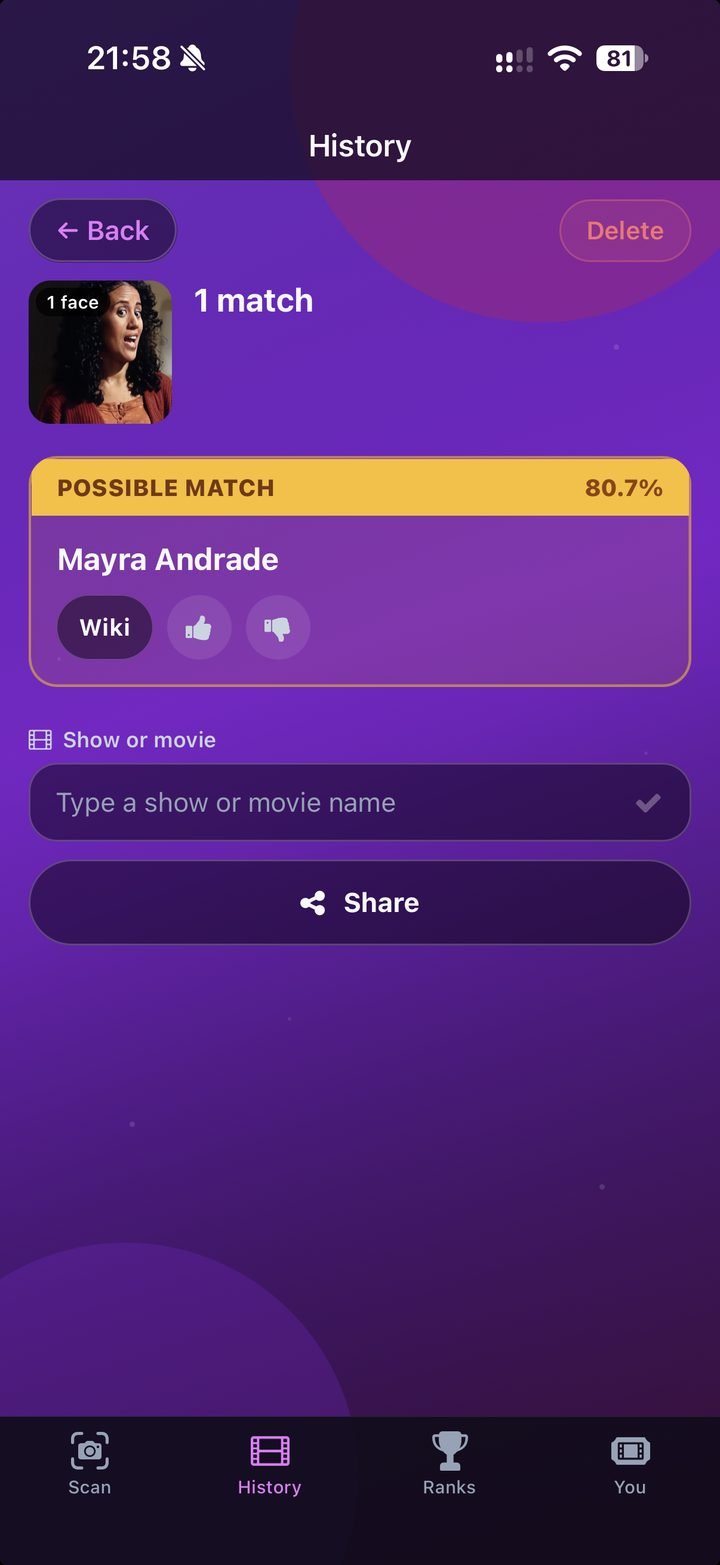
Use the Possible state as a prompt to check context (title, scene, co-stars), not as a finished ID. The Solid example above shows a stronger label on a multi-face still; Possible is the same tip-of-the-tongue job with lower certainty.
Screenshot vs phone photo of the TV
A direct screenshot from a streaming app is usually cleaner: no room lights in the glass, no moiré from the panel, sharper edges around the eyes and mouth. Use it when you can. A phone photo of the set is still fine for tip-of-the-tongue ID if the face fills the frame and you angle out reflections.
- Dim bright lamps behind you or shift the phone until the face is readable.
- Wait a beat for a larger close-up if the current pause is a wide establishing shot.
- Avoid heavy motion blur — rewind a second rather than fighting a soft frame.
- One clear face beats a crowded party scene where every head is tiny.
When Google, IMDb, or Lens are better first
- You know the title and character — IMDb cast or “who plays X in Y” is fastest.
- You can read a name, logo, or title card on screen — Lens or a normal search may be enough.
- You want a full filmography after you already have a candidate name — IMDb and Wikipedia own that job.
Use CelebSpotter when the missing piece is the face itself: no useful keywords, paused frame, tip of the tongue. That is visual ID for who’s on screen — not “which celebrity do I look like.” For an honest comparison of Lens, reverse image search, and CelebSpotter, see Google Lens vs reverse image vs CelebSpotter.
If the paused face is from a commercial or trailer rather than a show, the same capture habits apply — jump to who’s that actor in this ad. More tip-of-the-tongue how-tos live in the how-to guides hub.
Reading Solid vs Possible
Solid means we’re pretty sure. Possible means it might be them — helpful when the shot is awkward or the person is less famous. CelebSpotter is in beta, so treat every result as a hint. If Possible feels wrong, try another frame from a clearer angle rather than forcing the first guess.
Privacy and good use
You can try a scan without an account. Photos you submit are processed for that scan and are not used to train AI. This is for sofa curiosity about people on screen — not identifying private individuals for harassment or street surveillance. More detail lives on the face-matching and privacy pages.
FAQ
Can I identify an actor from a phone photo of the TV?
Yes. Pause on a clear face, fill the frame, reduce glare, and snap. A streaming screenshot is often cleaner, but a sharp phone photo of the screen works for tip-of-the-tongue ID.
What if the face is small, sideways, or blurry?
Rewind a few seconds for a larger, front-ish shot when you can. Side profiles, heavy makeup, masks, and soft pause frames are harder for any face tool — try another beat before giving up.
Is CelebSpotter a lookalike or “which celeb do I look like” app?
No. It is for naming who’s actually on screen in the photo you choose — shows, movies, and ads — not selfie lookalikes.
Do I need an account or the iPhone app?
No account is required to try a scan in the browser. The iPhone app is optional if you prefer camera-first on the sofa.
What do Solid and Possible mean?
Solid means we’re pretty sure of the match. Possible means it might be them — useful as a hint, not proof. CelebSpotter is in beta, so treat every result as a starting point.